
Yes, you can!
Instant Book is a great feature to generate some immediate bookings. It's an opt-in owner feature that allows you to automatically accept bookings. This means the hirer can book your vehicle in one click, without you having to accept it manually. The booking comes through as a confirmed, paid booking.
Hirers can still contact you without instantly booking your vehicle. The ‘Message Owner’ will still be available on your listing for hirers to contact you with any questions before they book.
Why choose Instant Book?
- Increased bookings - on average 20% more bookings
- Increased revenue - More bookings can lead to increased revenue
- Improved hirer experience - guests have a seamless and hassle-free booking process.
- Improved efficiency - no need for owner approval, less risk of losing a booking to another owner or platform
How to set up Instant Book
- Log in to your Owner Dashboard
- From the left-hand rail select "Listings", then "Manage Listing" on the van you want to edit.
- In the 'Pricing' section, select the radio button to turn Instant Book on or off:
- Choose your predetermined (0 to 3 days) maintenance period after bookings.
- Please note, Instant Book is not currently available for 'Deliver' hires, due to the nature of a delivery booking i.e. delivery fee needs to be agreed per booking. Example of manage listing dashboard with option to activate Instant Book on desktop
- Save your changes and your listing will be updated immediately.
- Your van will now be visible to book with the additional ‘Instant Book’ lightning icon on the ‘Book now’ button
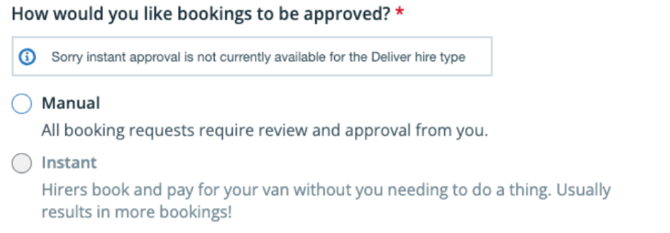
Option to activate Instant Book on desktop
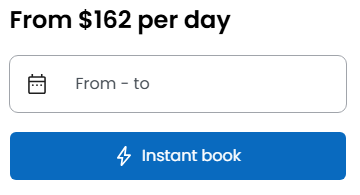
Example of booking widget with Instant Book activated
Key Instant Book questions:
What if I have Instant Book switched on and I receive a booking that I don’t want to accept?
Regular cancellation policies still apply to Instant Book bookings. To give you peace of mind, hirers cannot select the immediate next 2 calendar days to book via Instant Book. This means you will always have 2 days' notice of an Instant Book hire. You can also allocate between 0 and 3 maintenance days after the hire if you want to block out time between bookings.
Will Instant Book work with other Camplify features, such as variable pricing and minimum days?
Yes, we have ensured that Instant Book will be fully integrated with our existing customised listing functionality so that you can save time and reap the benefits.
What’s the booking process for a hirer making a booking with Instant Book?
The hirer will be notified throughout the booking process that the booking will be instantly approved upon payment. The hirer will have 12 hours to complete the booking before the booking process times out. The hirer will be required to complete payment of the booking in order for the booking to be made. Regular payment policies apply to Instant Book hires.
Can I accept same-day bookings if I choose to use Instant Book?
No. Same-day and next-day bookings are blocked for Instant Book listings. Hirers will get the following message if they attempt to book a listing for the same day - “Instant bookings can only start the day after tomorrow”.
A hirer can still ‘Message Owner’ to get in touch with you without making a booking request.
What information do I need to set up Instant Book?
Once Instant Book is switched on, all bookings for that vehicle are Instant bookings. However, hirers can still opt to ‘Message Owner’ without making a booking request if they have any questions for you.
Your listing should provide as much detail as possible to avoid cancellations as a result of the hirer not having the full picture at the time of booking. Some of this can be captured in the Description e.g. van and bed layout, what's provided (linen, kitchen utensils etc.), max weight, height, as well as the Additional Information e.g. parking is provided for the hirer’s car during the course of the hire.
It is critical that your listing has a clear list of Specific Hiring Rules, not only what the rules are during the hire itself (no smoking, max 100 km per day etc.) but what types of bookings you will not accept e.g. No music festivals, no off-road.
Example of a set of Hiring Rules
- No off-road - unsealed roads must be pre-approved in writing in Camplify Messages before the trip begins
- No smoking inside
- No pets
- No festivals
- No same-sex groups i.e. hen or stag parties
- Hirer age restrictions (21 or 25 and add maximum age too)
- Awning must be packed away before bad weather arises/leaving the van/overnight
- Standard pick-up / drop-off times are X
- No free-camping
- Rules on charging the van in order to go off-road camping
- Travel distance (radius from base) limits
- Any penalty charges e.g. $50 for late return
- What to do in the event of an emergency e.g. EMERGENCY - If any engine lights come on the dashboard, pull over immediately. If an accident occurs, get off the road, stay safe, call the number of the breakdown service provider provided to you / call me.
- What to do if damage occurs e.g. DAMAGE - If damage happens, you must report it immediately - who, what, where and when will be required.
- Limits on mileage (per-day or per-hire and what the additional mileage rate will be) e.g. LONG TRIPS - Hirers are welcome to take the van up to 200 km a day with a maximum of 1000 km included in the normal booking price. After 1000 km, you will be charged .45c per km at the completion of the trip.
- Rules on refuelling e.g. FUEL - Return full of DIESEL - All hires include a full tank upon departure.
- Rules on cleaning e.g. CLEANING - Clean the equipment and van. Excessive cleaning will incur a charge.
- What to do about waste water and gas e.g. GAS CYLINDER should be returned full; waste water must be emptied or risk a fine of $50.
Rates and availability should be up to date at ALL times.