What are discount codes?
Discount codes are a marketing feature that allows you to set up offers for your hirers. Discounts are a useful tool for managing your bookings and giving you more control of your business.
With Owner Discount Codes, you can:
- Create your own fixed-amount unique codes (e.g. REBOOK100, XMAS50) or create a percentage (%) discount
- Set a travel date range if you would like to restrict discounted bookings to a certain time of year
- Set an expiry date for your discount code
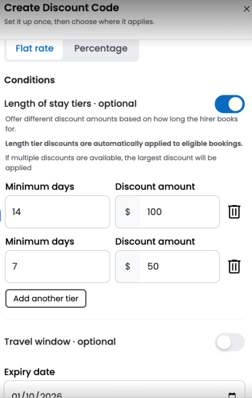
- Offer a one off discount or you can now set discounts based on trip length, these will automatically apply at time of hirer request.
- Offer discounts directly to your past or future hirers
- Encourage repeat bookings and reward loyal customers
- Run your own discounts whenever you like
How it works
Owner discount codes have been developed so owners have more control over how you promote your business. Discounts apply to the entire booking except for the Camplify booking fee and accident excess reduction (AER).
Note: Only one discount code can be used per transaction at the time of booking. The use of multiple discount codes in a single transaction is not possible.
How to Create a Discount Code
-
Log in to your Owner Account.
-
Click ‘Marketing Tools’ in the left hand menu.
-
Select ‘Discount Codes’ from the options.
-
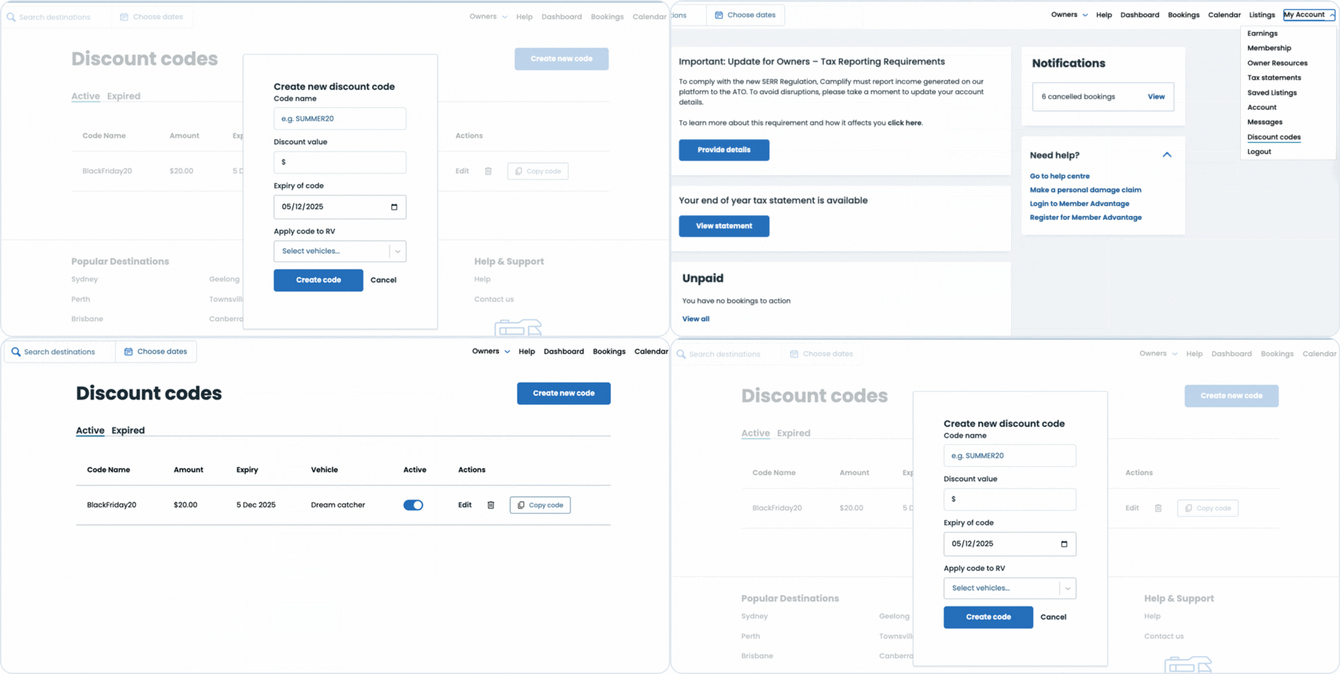
Create your own code by entering:
-
A code name (e.g. REBOOK50 or XMAS25)
-
A fixed discount amount (e.g. $50) or a percentage % discount
- Travel start and end dates (optional)
- An expiry date (there is no start date setting — codes are active immediately until the expiry date you choose).
-
Owners have been asking for more flexibility on how they apply discounts for selected trips and hirers. You are now able to set up tiered discounts. Choosing a % or $ off for specific trip lengths and travel periods of your choice.
Tiered discounts will auto apply within the hirers booking flow.